Compute backends
Every simulator and quantum computer you can run a Qollab project on, what each one costs, and how to choose between them.
When you run a project, the Select QPU dialog asks where it should execute. Every option falls into one of three groups, from free local simulators to real quantum hardware. The third group appears once IonQ has reported its machines, and it lists offline machines too, which you cannot pick.
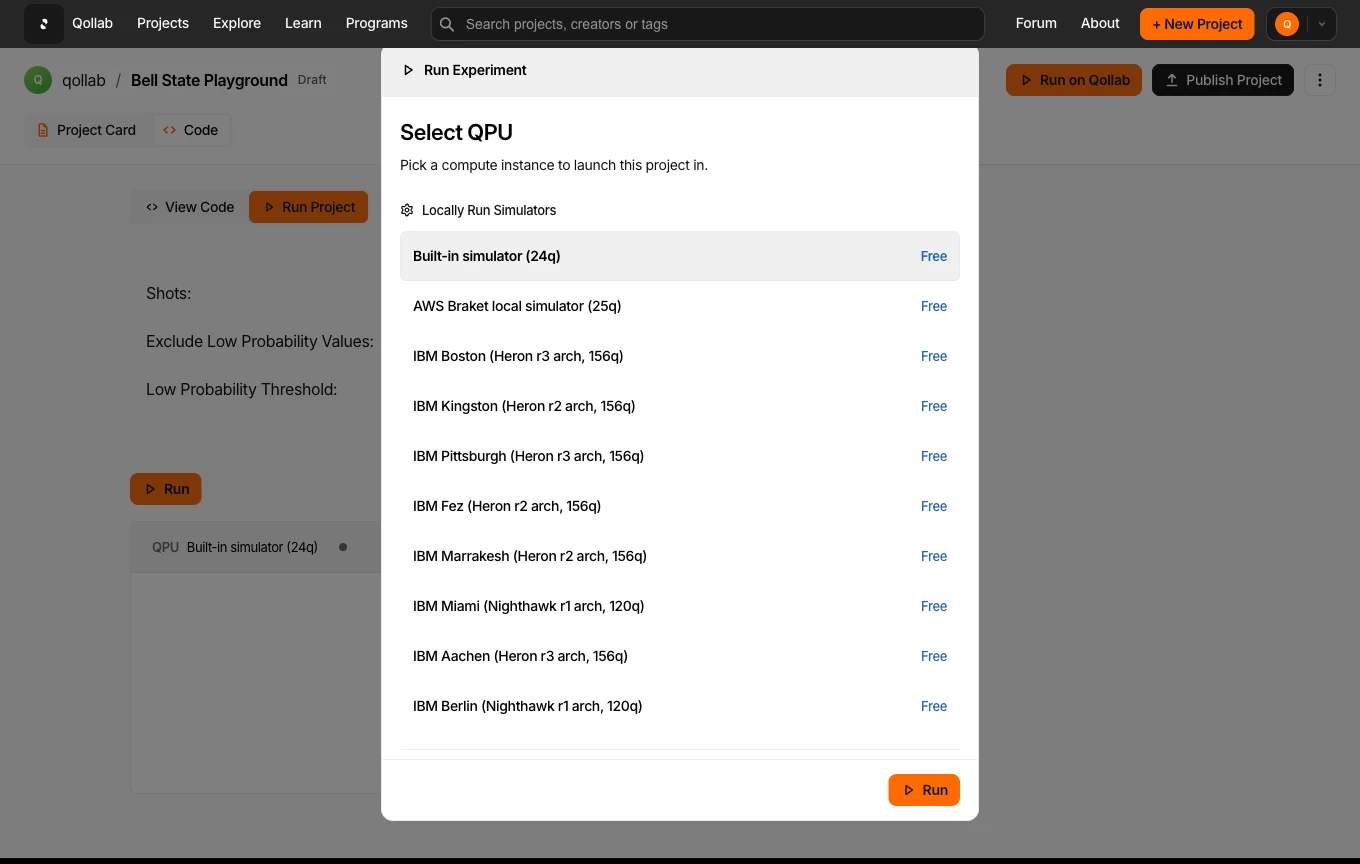
The three groups
- Locally run simulators run in your browser through WebAssembly. They are free and never queue. This group includes a built-in simulator, an AWS Braket local simulator, and a set of simulators that carry the real noise models of IBM devices. Those let you see how a circuit behaves on noisy hardware without leaving your browser. They are simulations of those machines, not the machines themselves. The built-in simulator starts at once. The AWS Braket and IBM simulators load their libraries the first time you pick one in a session. The IBM ones also build a model of their device on every run.
- Remotely run simulators run on IonQ's cloud rather than in your browser. Each entry in this group is a noise model of one IonQ QPU. Picking IonQ Forte 1 here runs IonQ's noise model of Forte on IonQ's cloud. They are free. IonQ has retired the Aria 1 and Aria 2 hardware, so the two Aria entries model a system that no longer runs.
- Quantum computers are physical IonQ hardware. Runs here consume credits, and a device is only available when it is online, so you may see one listed as offline.
The local simulators accept as many jobs as your code sends in one run. Both IonQ groups accept one job per run; The runtime environment explains how to fit a run into it.
Every backend
| Backend | Group | Qubits | Runs | Cost |
|---|---|---|---|---|
| Built-in simulator | Local simulator | 24 | In your browser | Free |
| AWS Braket local simulator | Local simulator | 25 | In your browser | Free |
| IBM Boston (Heron r3) | Local simulator, IBM noise model | 156 | In your browser | Free |
| IBM Kingston (Heron r2) | Local simulator, IBM noise model | 156 | In your browser | Free |
| IBM Pittsburgh (Heron r3) | Local simulator, IBM noise model | 156 | In your browser | Free |
| IBM Fez (Heron r2) | Local simulator, IBM noise model | 156 | In your browser | Free |
| IBM Marrakesh (Heron r2) | Local simulator, IBM noise model | 156 | In your browser | Free |
| IBM Miami (Nighthawk r1) | Local simulator, IBM noise model | 120 | In your browser | Free |
| IBM Aachen (Heron r3) | Local simulator, IBM noise model | 156 | In your browser | Free |
| IBM Berlin (Nighthawk r1) | Local simulator, IBM noise model | 120 | In your browser | Free |
| IonQ Aria 1 | Remote simulator | 25 | IonQ cloud | Free |
| IonQ Aria 2 | Remote simulator | 25 | IonQ cloud | Free |
| IonQ Forte 1 | Remote simulator | 29 | IonQ cloud | Free |
| IonQ Forte Enterprise 1 | Remote simulator | 29 | IonQ cloud | Free |
| IonQ Forte 1 | Quantum computer | 36 | IonQ hardware | Credits |
| IonQ Forte Enterprise 1 | Quantum computer | 36 | IonQ hardware | Credits |
The list of live machines changes as hardware comes online, so treat the dialog itself as the source of truth for what is available right now.
Those figures are ceilings, not guarantees. IonQ warns that a simulation sized close to the ideal or Forte-class qubit limit may still fail, depending on the specific circuit.
Shots cost time on the remote path. IonQ's noise-model simulation is shot-aware: it runs one simulation for every shot you request, so its run time grows with the shot count. Ideal simulation gets its probabilities from a single calculation instead. IonQ notes that the effect is mostly noticeable on circuits with many qubits and very large shot counts. Check that a small shot count works before you raise it.
The locally run IBM noise-model simulators also slow down as you add shots, unless they switch to the density-matrix method. Ideal vs. noise-model simulators explains when the switch happens.
IonQ periodically measures gate fidelities and other statistics on each QPU and publishes them as a characterization, a snapshot of that machine's performance at a moment in time. Qollab does not show those numbers in the Select QPU dialog; read them on IonQ's own backend list, under Characterization data on a backend's details.
Which one to pick
- Writing or debugging a circuit? Start on the built-in simulator. It is free, instant, and enough to catch logic and syntax errors.
- Want to see noise before you spend anything? Run one of the IBM noise-model simulators or an IonQ remote simulator. Both apply a real device's noise model to your circuit.
- About to spend credits on IonQ hardware? Run the matching IonQ remote simulator first. It is free, and it runs IonQ's own noise model of that machine.
- Ready for real hardware? Choose a quantum computer from the last group. This is the only group that uses credits, so verify your circuit on a simulator first.
Related
Stay in the loop.
Get the latest tutorials, demos, and project showcases straight to your inbox. No noise, just the good stuff.
Enable JavaScript to sign up.
Qollab updates only. Unsubscribe any time. Privacy Policy.
Running code