The app around the circuit
A circuit run takes seconds and can fail, and your interface has to handle both.

The app around a circuit has two jobs the previous lesson ignored. The app has to say something while the run is in flight, and it has to handle the run failing.
A Python script can ignore both jobs, because nobody watches its output while it waits. An interface has a person in front of it, and that person is looking at your screen for the eighty seconds it takes a first press to come back.
Switching to JS / Qiskit
The Playground runs quantum projects in two frameworks. The last lesson used Python. JS / Qiskit gives you three editable panes, JavaScript, HTML and CSS, plus a live preview, so you can build a working interface without installing anything.
The API is the Python Qiskit API with three conventions on top: no new when constructing, .callKwargs for keyword arguments, and .toJs() to unpack a Python value. Course 3's lesson on running a circuit in JavaScript covers the editor itself, the four panes and browser support.
Your JavaScript runs in a sandboxed frame in your browser, and so does backend. That frame loads the same Python runtime a Python project uses and runs the same prologue, from the same Run Experiment dialog, so a JavaScript project reaches IonQ the way a Python one does.
The interface
// 'backend' already exists when this runs: it is whatever you pick in the Run Experiment dialog.
import { QuantumCircuit } from 'qiskit';

const shots = 1000;          // one press buys this many draws
const pRare = 0.3;           // the app's input: how often a draw should come up rare

const out = document.getElementById('out');
const bar = document.getElementById('bar');
const foot = document.getElementById('foot');

function buildCircuit(p) {               // app value in, circuit out
  const theta = 2 * Math.asin(Math.sqrt(p));
  const qc = QuantumCircuit(1, 1);       // no `new`: the constructor is called like Python's
  qc.ry(theta, 0);
  qc.measure(0, 0);
  return qc;
}

function decode(counts, n) {             // counts in, something the app can use out
  const rare = counts['1'] ?? 0;
  return { rare, common: n - rare, share: rare / n };
}

out.textContent = 'Opening ' + shots + ' boxes...';   // the in-flight state, because this takes real time

try {
  const job = await backend.run(buildCircuit(pRare), { shots });
  const result = await job.result();
  const counts = result.get_counts().toJs();   // .toJs() unpacks the Python dict into a plain object

  const drawn = decode(counts, shots);
  out.textContent = drawn.rare + ' rare, ' + drawn.common + ' common';
  bar.style.width = (drawn.share * 100).toFixed(1) + '%';
  foot.textContent = 'share ' + drawn.share.toFixed(3) + ', asked for ' + pRare.toFixed(3);
} catch (err) {
  out.textContent = 'The run did not finish: ' + err;   // the failed state, because it can fail
  foot.textContent = 'Press Run to try again.';
}
buildCircuit and decode are the same two functions as lesson 3, in another language.
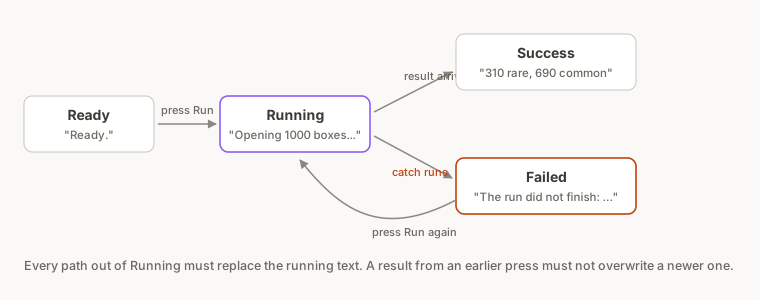
The new code sits on either side of the call.
The in-flight state. The line before backend.run writes "Opening 1000 boxes..." into the page. Without that line the interface sits unchanged for the ten to fifteen seconds the job takes, and a person can decide your app is broken and reload.
The failed state. The catch writes the error where the result would have gone, and tells the reader they can press Run again. A quantum run has more ways to fail than a local function call: the queue can reject the job, the network can drop, and the backend can error. Code that assumes success never replaces the in-flight text.
Both states are ordinary front-end work, needed by any remote call that is slow and can fail, including a circuit run.
Assignment: make the run fail on purpose
A real failure is hard to wait for, so throw one on purpose.
- In your fork, add
console.log('ui state: success');as the last line inside thetryblock, after the bar is set. - Add
console.log('ui state: failed');as the first line insidecatch. - Add
throw new Error('test failure');as the first line insidetry, abovebackend.run. - Predict what the preview will show, and predict which of the two console lines will appear.
- Press Run on Qollab, choose IonQ Aria 1 (25q) under Remotely Run Simulators, and press Run.
- Write down the console line and the preview text.
- Delete the
throwline, and press Run again. - Write down the console line and the preview text this time.
Solution
With the throw in place the circuit never runs. The exception is raised before backend.run, control jumps straight to catch, the console prints ui state: failed, and the preview reads "The run did not finish: Error: test failure" with "Press Run to try again." underneath.
Remove the throw and the same interface comes back through the other path: ui state: success, and the tally in the preview.
Neither path leaves the preview on "Opening 1000 boxes...", as Figure 1 shows.
A real failure looks the same to your code: it arrives in catch, and the running text needs replacing.
.toJs() returns a plain object, not a Map
const counts = result.get_counts().toJs();
get_counts() returns a proxy to a Python dict. .toJs() unpacks that proxy, and on this platform the result is a plain JavaScript object, so counts['1'] works and Object.keys(counts) works.
Our first version wrapped the .toJs() result in Object.fromEntries, the call you would write if .toJs() returned a Map. .toJs() does not, and the run failed with TypeError: object is not iterable. The circuit had executed correctly and the job had completed; the failure was one wrapper call of JavaScript after the boundary.
The page and its styles
The other two panes are small on purpose, because they are yours to replace.
<div id="picker">
  <h1>Loot box opener</h1>
  <p class="sub">One press opens 1,000 boxes. The circuit decides how many are rare.</p>
  <p id="out" class="out">Ready.</p>
  <div class="track"><div id="bar" class="bar"></div></div>
  <p id="foot" class="foot"></p>
</div>
#picker { font: 15px/1.5 system-ui, sans-serif; color: #1a1a1a; max-width: 460px; margin: 0 auto; padding: 8px; }
#picker h1 { font-size: 19px; margin: 0 0 4px; }
#picker .sub { margin: 0 0 18px; color: #555; font-size: 13px; }
#picker .out { font-size: 17px; font-weight: 600; margin: 0 0 8px; }
#picker .track { background: #ececf0; border-radius: 999px; height: 14px; overflow: hidden; }
#picker .bar { background: #6d4aff; height: 100%; width: 0; transition: width .35s ease; }
#picker .foot { color: #666; font-size: 12px; margin: 8px 0 0; font-variant-numeric: tabular-nums; }
Assignment: watch the two states, then press again
- Open
/u/qollab/learn-app-ui, press Fork, then Fork Project in the dialog. - In your fork, press Run on Qollab, choose IonQ Aria 1 (25q) under Remotely Run Simulators, and press Run.
- Watch the preview while the job runs. Write down what the preview says before the result arrives.
- When the result lands, write down the two numbers and the share.
- Press Run again without changing anything, and write down the new numbers.
Solution
Before the result arrives the preview reads "Opening 1000 boxes...".
Our run on 22 September 2026 came back with 310 rare and 690 common, a share of 0.310 against the 0.300 asked for. Yours will differ, and your second press will differ from your first, for the reason lesson 2 gave.
The bar moves between presses because its width is set from the share.
Live, recorded, precomputed or scheduled
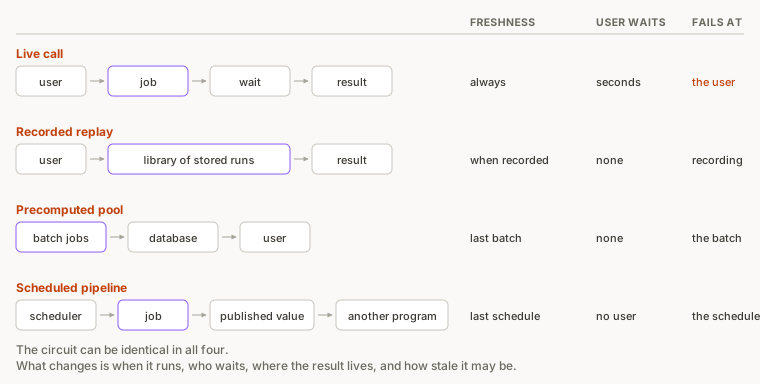
Your fork makes a live call: a person presses a button and waits for a quantum computer. A live call is one of four shapes in Figure 2.
Live call. You just built this shape: the user waits the full latency on every press. It suits a tool whose purpose is running the circuit, such as the Playground itself.
Recorded, then replayed. Quantum Butterfly Field runs two tracks. An exact statevector simulation runs live on every visit inside a serverless function and drives the animation. The damage-and-healing fidelities come from IonQ Forte runs captured offline and replayed from a library, per the write-up, so each visit draws a different recorded run. Nobody waits for a queue, and the fidelities still come from hardware.
Precomputed pool. Quantum Garden is the project from lessons 1 and 2, and its write-up gives the reasoning. Running circuits live when a visitor arrives would be slow and expensive. So the team computes a pool of measurement results in advance, and each plant draws from it when first observed. The write-up puts the reveal of a plant's traits at under 50 milliseconds.
Garden's stack is Next.js, React, Three.js, Qiskit, IonQ and PostgreSQL. Four of those six, everything except Qiskit and IonQ, are ordinary web tools.
Scheduled pipeline. The Quantum Systemic Oracle is built to run once a day: a Python engine pulls market signals, a quantum step runs on IonQ, and the result is published on-chain. Smart contracts can then read the result with the same call they would use for a price feed.
The Oracle's write-up describes the output as a number other code builds on rather than a dashboard for people. When another program consumes your result, neither the in-flight state nor the failed state applies, and a scheduled pipeline is enough.
The choice between the four shapes is a latency and cost decision, made the way you would make it for any expensive third-party call.
Assignment: turn your live call into a replay
Your fork currently calls the circuit every time someone presses Run. Make your fork behave like Butterfly Field's recorded replay instead.
- In your fork, copy the tally from your last run into the code as a literal object, for example
const recorded = { '0': 690, '1': 310 };. - Add a constant near the top,
const useRecorded = true;. - Change the code so that when
useRecordedis true it decodesrecordedand never callsbackend.run, and when it is false it runs the circuit as before. - Press Run with
useRecordedset to true and time how long the result takes to appear. - Set
useRecordedback to false, press Run, and time it again. - Write down what the replay gained and what it gave up.
Solution
The shape of the change is a branch around the call:
let counts;
if (useRecorded) {
  counts = recorded;
} else {
  const job = await backend.run(buildCircuit(pRare), { shots });
  counts = (await job.result()).get_counts().toJs();
}
With the branch taken the result appears the moment your code starts, because nothing leaves the machine. The Playground still loads its runtime first, and that load is separate from the job wait the replay removes. With the branch false you are back to waiting for the job too.
The replay removed the job wait and gave up freshness: the tally is fixed, identical on every visit, and it stops being a sample of anything once your circuit changes. Butterfly Field keeps a library of recorded runs and draws a different one each visit, so repeat visits do not all show the same result.
Takeaway
A run on IonQ's cloud takes seconds and can fail, so a page that runs the circuit live needs an in-flight state and a failed state. Run the circuit ahead of time when a person should not wait on each press, when each press would cost too much, or when another program reads the result. The three ways to do that are a recorded replay, a precomputed pool and a scheduled pipeline. The result is then only as fresh as the last run.
Lesson 5 measures whether the quantum version was worth building.
Stay in the loop.
Get the latest tutorials, demos, and project showcases straight to your inbox. No noise, just the good stuff.
On this page