Inputs in, a result out
Build the circuit from application data, run it, and decode the tally into a typed result.

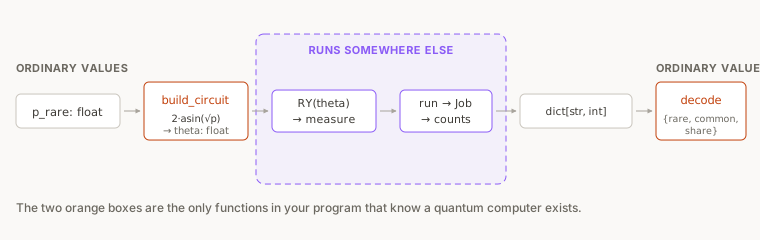
Inputs go in as application data and a result comes back as a tally. Write the code between the two as three steps, and let no other part of your program touch a circuit.
Without the three steps, circuit code turns up all over your program. Angles get computed where the HTTP handler lives, counts.get("1", 0) turns up in a template, and before long nobody can change the circuit without reading the whole application. With the three steps in place, the rest of your program calls one function and gets a dict back.
The three steps are:
build_circuit(p)takes an application value and returns a circuit. Nothing else in your program builds circuits.- the run submits the circuit and waits. The run is the only place
backendappears. decode(counts, n)takes the tally and returns something typed. Nothing else in your program reads raw counts.
A weighted random picker
The picker takes a number of draws and a probability, say a thousand draws at thirty percent, and returns how many came up rare. Loot boxes, playlist shuffles and A/B assignments all work this way.
You are going to build the picker on a quantum computer, and lesson 5 measures whether that was worth doing.
Where backend comes from
backend is the one name in the listing that is never declared: it already exists when your code runs, as a global handed to your script before its first line, and it is whatever you chose in the Run Experiment dialog. You never construct backend or name a machine in code, so you change where the circuit runs in the dialog.
The circuit
The circuit is three lines:
qc = QuantumCircuit(1, 1)
qc.ry(theta, 0)
qc.measure(0, 0)
You met ry in Course 2, where the lesson on rotations showed that the angle sets how often the qubit reads 1. Your application data enters the circuit through that angle.
2 * asin(sqrt(p)) is the angle that puts the probability of measuring 1 at exactly p: at p = 0.3 the qubit reads 1 three times in ten, on average.
The whole listing
# 'backend' already exists when this runs: it is whatever you pick in the Run Experiment dialog.
from math import asin, sqrt
from qiskit import QuantumCircuit
from qiskit.providers.jobstatus import JobStatus
import time
1shots = 1000
2p_rare = 0.3
3def build_circuit(p):
theta = 2 * asin(sqrt(p)) # the angle whose RY puts P(1) at exactly p
qc = QuantumCircuit(1, 1)
qc.ry(theta, 0)
qc.measure(0, 0)
return qc
4def decode(counts, n):
rare = counts.get("1", 0)
return {"rare": rare, "common": n - rare, "share": rare / n}
qc = build_circuit(p_rare)
print(qc)
5job = backend.run(qc, shots=shots)
while job.status() not in (JobStatus.DONE, JobStatus.ERROR, JobStatus.CANCELLED):
time.sleep(5)
counts = job.result().get_counts()
print(counts)
6result = decode(counts, shots)
print(f"opened {shots} boxes: {result['rare']} rare, {result['common']} common")
print(f"share rare: {result['share']:.3f} asked for: {p_rare:.3f}")
- 1one press buys this many draws
- 2the app's input: how often a draw should come up rare
- 3app value in, circuit out
- 4counts in, something the app can use out
- 5one job, the circuit run 1,000 times
- 6the only line the rest of an app would need
Lines 1 to 5 are imports and the note about backend. Lines 7 and 8 are the two numbers you will change. The two functions and the backend.run call are the boundary. Lines 24 to 36 are the script that uses them: build, run, wait, decode, print.
backend.run returns straight away with a job rather than a result, because the work happens on IonQ's cloud. The loop polls until the job reaches a terminal state, and it checks for ERROR and CANCELLED as well as DONE, because a job that fails would otherwise leave you polling forever.
Predict, then run
Before you press anything, write down a number: out of 1,000 shots at p_rare = 0.3, how many do you expect to read 1?
Then open the project, press Run on Qollab, choose IonQ Aria 1 (25q) under Remotely Run Simulators, and press Run.
Our run on 22 September 2026 printed this:
     ┌────────────┐┌─┐
  q: ┤ Ry(1.1593) ├┤M├
     └────────────┘└╥┘
c: 1/═══════════════╩═
                    0
{'0': 720, '1': 280}
opened 1000 boxes: 280 rare, 720 common
share rare: 0.280   asked for: 0.300
The tally read 280 ones, against the 300 we asked for.
A prediction of exactly 300 is correct for the distribution, and as lesson 2 showed, a tally will almost never match it. The spread to expect at 1,000 shots is about ±28 either side of 300. Our 280 sits inside that band, as would 315, and so will yours nineteen times out of twenty.
The drawn circuit at the top shows Ry(1.1593), which is 2 * asin(sqrt(0.3)) in radians. Your application passed a probability, and build_circuit converted it to that angle.
Assignment: change the probability and predict the tally
You need your own copy before you can change anything, because a published project is read-only to everyone but its owner.
- On the project page, signed in, press Fork, then keep or change the name in the Fork Project dialog and press Fork Project. You now have your own copy at your own username.
- In your fork, change line 8 to
p_rare = 0.5. - Work out what the new angle will be, in radians, and what the drawn circuit should show.
- Write down how many of the 1,000 shots you expect to read 1.
- Press Run on Qollab, choose IonQ Aria 1 (25q) under Remotely Run Simulators, and press Run.
- Compare the drawn circuit and the tally against both of your predictions.
Solution
2 * asin(sqrt(0.5)) is 2 * asin(0.7071), which is pi/2, or 1.5708 radians. The drawn circuit should read Ry(π/2): the console writes an angle as a fraction of pi whenever one fits, and none fits the 1.1593 of the run above.
Expect about 500 shots reading 1. At 1,000 shots the 95% spread is roughly 469 to 531, so any count in that range is normal.
At p = 0.5 the rotation is exactly a quarter turn, and the two outcomes are equally likely. Other probabilities give less round angles from the same formula.
Inside decode
decode is three lines long, and it turns the quantum result into ordinary data.
def decode(counts, n):
    rare = counts.get("1", 0)
    return {"rare": rare, "common": n - rare, "share": rare / n}
decode uses counts.get("1", 0) instead of counts["1"] because a key you expect can be absent. At p_rare = 0.001 a thousand shots contain no ones about one press in three, and counts["1"] would raise a KeyError in production, intermittently.
The return value is a dict with named keys. A dict like {"rare": 280, "common": 720, "share": 0.28} can be read by someone who has never heard of a qubit.
Testing the half you can test
A circuit run is slow, costs shots and returns something different every time, which makes it hard to test. decode is none of those: a pure function from a dict to a dict, which you can test without a quantum computer.
assert decode({"0": 700, "1": 300}, 1000) == {"rare": 300, "common": 700, "share": 0.3}
assert decode({"0": 1000}, 1000) == {"rare": 0, "common": 1000, "share": 0.0}
The second assert feeds decode a tally with the "1" key missing, the low-probability case, and passes only because decode uses counts.get("1", 0). Swap in counts["1"] and the second assert raises within milliseconds on your own machine.
You can test build_circuit the same way, by checking the angle it produces for a known p. Only the run in the middle needs a backend, and it contains no logic of its own.
Assignment: break the decoder without running a circuit
- In your fork, add the two
assertlines above, directly under thedecodefunction. - Press Run on Qollab and confirm the script still finishes. Passing asserts print nothing.
- Change
counts.get("1", 0)tocounts["1"]. - Predict which of the two asserts fails, and what the error will say.
- Press Run again.
- Read the traceback, then change the line back.
Solution
The second assert fails, with KeyError: '1', and the traceback points inside decode.
The first assert passes either way, because that tally has both keys. A test suite containing only the first line would have told you the code was fine.
The asserts sit above the calls to build_circuit and backend.run, so the failing one stops the script before any circuit is built or submitted.
Assignment: change what the boundary hands back
Leave p_rare = 0.5 from the previous task in your fork.
- In your fork, change
decodeso the returned dict also carries apercentkey, the share expressed out of 100 and rounded to one decimal place. - Change the last
printso it prints that percentage instead of the share. - Before running, work out what the printed percentage should be, given the tally you already have on screen from the previous task.
- Press Run on Qollab, choose IonQ Aria 1 (25q) under Remotely Run Simulators, and press Run.
- Check the printed percentage against the
'1'count in the new tally.
Solution
One line added and one changed:
def decode(counts, n):
    rare = counts.get("1", 0)
    return {"rare": rare, "common": n - rare, "share": rare / n, "percent": round(100 * rare / n, 1)}
print(f"rare share: {result['percent']}% asked for: {100 * p_rare}%")
The percentage should be the '1' count divided by ten, since there are 1,000 shots. A tally of 507 gives 50.7%.
The printed percentage will not be exactly 50%, and it will differ from the previous task's run, because pressing Run again drew a fresh sample.
Takeaway
Keep the circuit behind three steps. build_circuit turns your data into a circuit, the run submits it and waits, and decode turns the tally into a typed value the rest of the program uses. Only the run needs a backend, so both functions can be tested like any other code.
Lesson 4 puts the boundary behind an interface, which has to show something during the wait and handle a failed run.
Stay in the loop.
Get the latest tutorials, demos, and project showcases straight to your inbox. No noise, just the good stuff.
On this page
- 1A weighted random picker
- 2Where backend comes from
- 3The circuit
- 4The whole listing
- 5Predict, then run
- 6Assignment: change the probability and predict the tally
- 7Inside decode
- 8Testing the half you can test
- 9Assignment: break the decoder without running a circuit
- 10Assignment: change what the boundary hands back
- 11Takeaway