Noise, and the real machine
The same Bell pair on four IonQ noise models, what changes on a real quantum computer, and how to publish your circuit as a public project.

Noise produced the small tail some tallies in this course carried: a stray 0 under an X gate, a few 01s and 10s from a pair that should always agree.
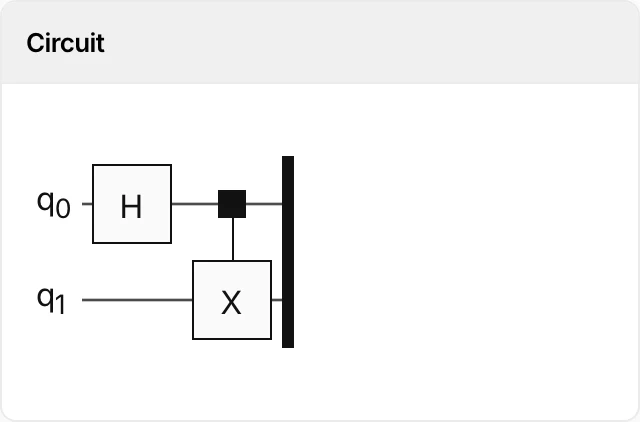
The listing below measures that tail with lesson 3's Bell pair at four times the shots, so a one-percent tail shows up as about forty shots instead of ten. You run it on the models of four IonQ machines, compare the four tails, then look at where the real machines sit in the same dialog.
What a noise model is
The four simulators under Remotely Run Simulators share one engine: each is IonQ's simulator with a noise_model option set to one of IonQ's machines, which the Playground passes along when you pick one.
IonQ describes these as an approximation of the named system's performance, with no guarantee of accuracy. For the two Aria models IonQ publishes how the model works: an error applied after every gate, at a rate measured on the machine. For the two Forte models it has not yet. Either way, the listing treats each model as a black box and measures what it does to the tally.
The circuit is the same on every model here, so a difference between the disagree counts comes from the models or from sampling.
The disagree count
The ideal Bell tally is 00 and 11 only, so every 01 or 10 is a wrong answer. The listing adds them up as disagree and prints the share. The share of disagreeing shots is one measure of the noise, the errors that made the pair disagree; an error in a phase does not show in it.
The circuit, then the code
The Bell pair is unchanged. Three things are new around it: 4,000 shots, a line that prints which machine the run imitates, and the two counting lines at the end.
# 'backend' already exists when this runs: it is whatever you pick in the Run on Qollab dialog.
from qiskit import QuantumCircuit
from qiskit.providers.jobstatus import JobStatus
import time
1shots = 4000
2print("backend:", backend.name, "| noise model:", backend.options.get("noise_model", "none"))
qc = QuantumCircuit(2, 2)
qc.h(0)
3qc.cx(0, 1)
qc.measure([0, 1], [0, 1])
job = backend.run(qc, shots=shots)
while job.status() not in (JobStatus.DONE, JobStatus.ERROR, JobStatus.CANCELLED):
time.sleep(5)
counts = job.result().get_counts()
print(counts)
4agree = counts.get("00", 0) + counts.get("11", 0)
5disagree = shots - agree
print(f"agree: {agree:5d} ({100 * agree / shots:5.2f}%)")
print(f"disagree: {disagree:5d} ({100 * disagree / shots:5.2f}%)")
- 1more shots than before, so a small tail is measured rather than guessed
- 2which backend ran it, and which machine the model imitates
- 3the Bell pair from lesson 3: the two qubits should always agree
- 4the pair's signal
- 5the tail: every shot where the pair disagreed
Run the pair on two models
Open the project, press Run on Qollab, choose IonQ Aria 1, and press Run. Copy the console's disagree line somewhere; the next press replaces it. Before the second press, write down a guess: will Forte 1's tail be bigger or smaller than Aria 1's? Nothing so far says which; the two presses check the guess.
Then press Run on Qollab again and choose IonQ Forte 1. The code is the same; the first printed line names the model. Copy this disagree line too.
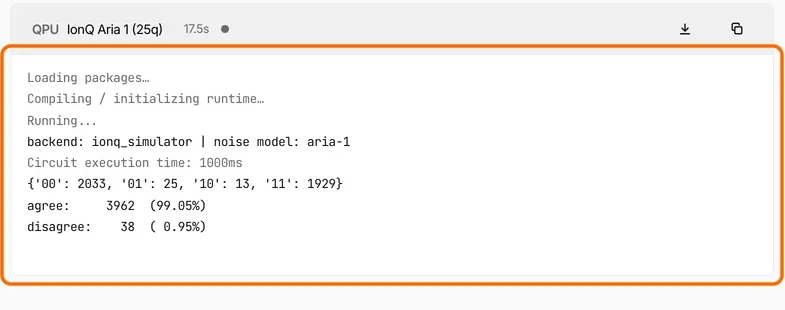
Our two presses on 15 September 2026:
| noise model | counts | disagree |
|---|---|---|
aria-1 | {'00': 2033, '01': 25, '10': 13, '11': 1929} | 38 (0.95%) |
forte-1 | {'00': 1922, '01': 14, '10': 24, '11': 2040} | 38 (0.95%) |
The same number came back twice. A tail of about 1% counted over 4,000 shots has a scatter of about 6 shots, so nineteen presses in twenty land within 13 shots of the true value.
The difference between two presses scatters more than one press does, by the square root of two: about 9 shots. So two presses on the same model can differ by close to 20 shots with nothing changed but the sample.
Assignment: complete the table
- Run the listing on IonQ Aria 2 and copy the console's
disagreeline; the first line of each console names the model. - Run it on IonQ Forte Enterprise 1 and copy that
disagreeline too, before the next press replaces it. You now have all four models from your own presses. - Compare your four numbers against the 20-shot bar above: two numbers 8 apart cannot be told apart by one press each, and two numbers 40 apart can.
- Write one sentence saying whether any two models differ.
Solution
Our four presses gave 38, 38, 36 and 44 shots. Aria 2 came back {'00': 2018, '01': 19, '10': 17, '11': 1946} and Forte Enterprise 1 {'00': 2007, '01': 22, '10': 22, '11': 1949}.
The largest gap is 8, well under 20, so no pair of models differs by more than a fresh press of the same model could.
On this two-gate circuit, then, one press per model cannot tell the four models apart: each put the pair wrong about once in a hundred shots.
Your four numbers will differ from ours, and by the 20-shot bar they will most likely not separate the models either.
Whether the model counts depth
On a real machine every gate is a physical operation with its own small chance of going wrong, so a deeper circuit, more gates executed one after another, is expected to come back with a bigger tail, which is one reason algorithms are counted in gates.
You can test whether the model does the same: make the circuit deeper without changing what it computes, and watch the tail. IonQ compiles what you submit before it runs, though, and gates that cancel can be removed on the way.
Assignment: pad the circuit and watch the tail
- Fork the project, as in lesson 1.
- In your fork, add
qc.cx(0, 1)twice, directly under the existing one, so the circuit runs three CNOTs where the last two undo each other. The ideal tally does not change: two CNOTs in a row are the identity. - Write down what you expect from a model that adds error per gate, and from one that does not.
- Press Run on Qollab and choose the same model as your plain-circuit press.
- Compare the two
disagreelines against the 20-shot bar before you call a difference real.
Solution
qc.h(0)
qc.cx(0, 1)
qc.cx(0, 1)
qc.cx(0, 1)
qc.measure([0, 1], [0, 1])
On our presses the padded circuit's tail was 32 shots against 38 for the plain one: no growth beyond the scatter.
Most likely the padding never ran. IonQ says a job to a noisy simulator is compiled and optimised the same way as a job to a machine. Removing gates that cancel is part of that, so two CNOTs in a row can be gone before the model sees them. Every CNOT you wrote is submitted; the console does not say what the compiler kept.
So this experiment cannot tell a model that adds no error per gate from extra gates that were compiled away.
Where the real machines sit
Scroll to the bottom of the Run on Qollab dialog and the last group is Quantum Computer: the physical IonQ machines, in the same list as their models.
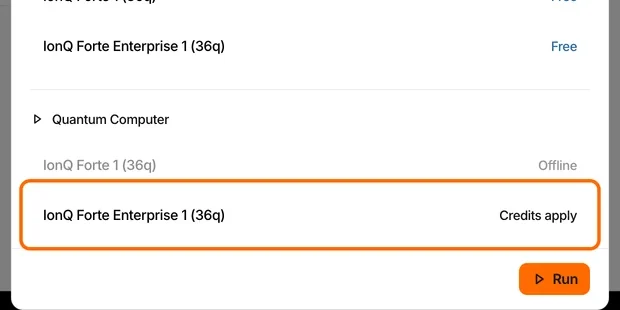
The code does not change: the backend global from lesson 1 lets the same listing run on a simulator in your browser, on a machine's model, or on the machine.
On the machine the first line names a different backend, ionq_qpu.forte-1 in place of ionq_simulator, and the model field shows its default, ideal, because on the machine there is no model to set. The tail then comes from the machine's own errors.
No lesson in this course needs a paid run. A run on a real machine costs credits, and Before you spend credits lists the checks to make first. Every option in the dialog is listed with its qubit count and cost under compute backends.
Publish your circuit
The last step is to publish one of your circuits. Anyone can open a public project on Qollab, and anyone signed in can run it and fork it.
In the fork you want to publish, edit the circuit into something of your own. Then open its Project Card tab: the write-up is a Markdown editor with a Preview toggle, and it saves on its own as you type. Write what the circuit does and how to run it, and say which licence it carries; each course project ends with the line MIT license. Fork it, change it, keep it., which you can keep.
Then publish it from the project header. The Draft label clears and the project is public at qollab.xyz/u/<your username>/<your project>.
The docs cover later versions and the project page, which people read before they press Run.
Assignment: publish a circuit of your own
- Take any circuit from this course and change what it computes, not only its name: a Bell pair with a rotation on one qubit before the CNOT, a search that marks a different answer, an X gate on the qubit nobody measured.
- On the project page, say what you changed and what the tally shows because of it.
- Publish it by the procedure above, then open the URL in a private window.
Solution
There is no single answer here. Check that qollab.xyz/u/<your username>/<your project> opens in a private window where you are not signed in. A good project page also lets a stranger predict the tally before they press Run.
You have finished Programming your first quantum circuits.
Stay in the loop.
Get the latest tutorials, demos, and project showcases straight to your inbox. No noise, just the good stuff.
Enable JavaScript to sign up.
Qollab updates only. Unsubscribe any time. Privacy Policy.
On this page