Fork and continue a project
Fork any public project into your own editable copy.
A fork is your own copy of someone else's public project.
1. Find a project to fork
Browse Projects or open any public project you want to build on.
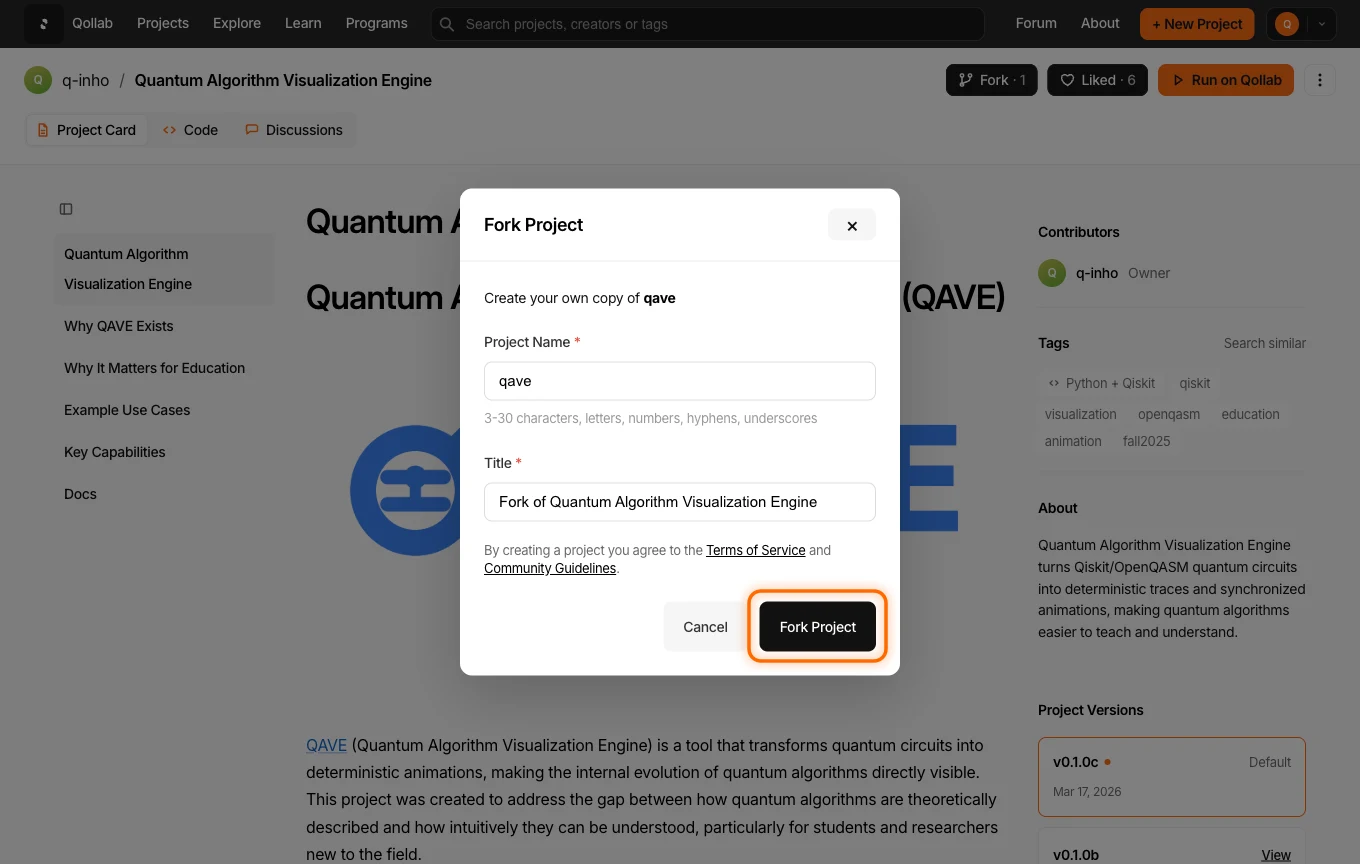
2. Fork the project
Click Fork in the project header.

The Fork Project dialog keeps Project Name equal to the source project's name and prefills Title as Fork of <original title>. Adjust either field if you like, then confirm with Fork Project.
3. Continue working
Your fork is a private draft on your own account, opened in edit mode with the original's code and write-up already in place. From here it is a normal project: change the code, run it in the Code Playground and rewrite the description. The original is untouched, and it keeps a count of the forks it has.
4. Publish your version
When your version is ready, publish it the way you published your first project. Keep the original author credited when you build on their work, as the community guidelines ask. If your fork adds something meaningful, the Grant Program rewards fork-and-extend work with credits.
Related
Stay in the loop.
Get the latest tutorials, demos, and project showcases straight to your inbox. No noise, just the good stuff.
Enable JavaScript to sign up.
Qollab updates only. Unsubscribe any time. Privacy Policy.